

How Can I Measure Fibre Length and Loss Accurately?
Posted on: 11/03/2025
What Is an OTDR and How Does It Help?
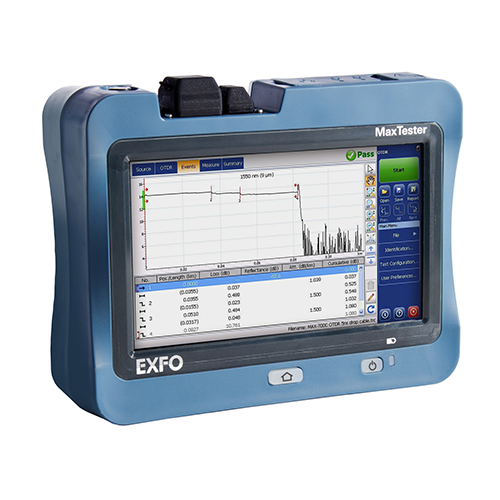
An Optical Time Domain Reflectometer (OTDR) sends light pulses through a fibre optic cable. These pulses travel down the fibre and reflect when they encounter inconsistencies, like breaks, splices, or bends. The OTDR measures the time it takes for the light to return, which helps determine the fibre length and the loss over its span.
This makes OTDRs an essential tool for fibre optic testing, whether installing new cables or maintaining an existing network.
Measuring Fibre Length
To measure fibre length accurately with an OTDR, follow these steps:
Set the proper test parameters: Choose the correct wavelength and pulse width for the type of fibre you're testing (single-mode or multi-mode).
Conduct the test: Position the OTDR at one end of the fibre and ensure the equipment is calibrated for the fibre you're working with.
Read the results: The OTDR displays the length of the fibre and identifies any imperfections along the way.
Measuring Fibre Loss
Fibre loss measurement is critical for assessing the quality of your network. Here's how to measure it with an OTDR:
Test at different wavelengths: Fibre loss can vary depending on the wavelength used. Measure at 850nm (for short-range) and 1310nm or 1550nm (for longer distances).
Use a reference cable: This helps ensure your measurements are accurate by compensating for any inherent losses in the OTDR.
Review the trace: The OTDR trace will show the loss across the fibre, and a loss more significant than expected may indicate issues such as poor splicing or fibre degradation.
What Cables Should You Use with Your OTDR?
When using an OTDR, selecting the proper launch and receive cables is crucial for accurate readings.
Launch Cable: A launch cable helps the OTDR establish a clear signal and improves its ability to detect the beginning of the fibre under test. Typically, it's a short fibre that matches the type of fibre you're testing.
Receive Cable: The receive cable helps the OTDR accurately capture the returning light. Make sure it has specs similar to your launch cable.
By using high-quality cables that match the fibre type and OTDR model, you ensure that your measurements are as accurate as possible.
Why Trust an OTDR for Fibre Measurement?
Think of your OTDR as the "surgical tool" for fibre testing— it's not just about measuring the fibre length but about diagnosing any issues that could affect the overall performance. Sure, you could rely on a more straightforward method. Still, an OTDR gives you more reliable, detailed information in real time, which is priceless when troubleshooting or verifying fibre performance.
So, if you want to measure fibre length and loss accurately, your best bet is to trust an OTDR. It will give you detailed, precise results to ensure everything runs smoothly.


FAQs
What is an OTDR used for?
An OTDR measures the performance of fibre optic cables, detects faults, and measures fibre length and loss.
How does an OTDR measure fibre length?
An OTDR sends light pulses through the fibre and measures the time it takes for the light to return after encountering different points in the cable. This time difference is used to calculate the fibre length.
What is fibre loss, and why is it important?
Fibre loss refers to the reduction in signal strength as light travels through the fibre. High fibre loss can cause signal degradation, making measuring and managing this loss crucial to ensure optimal network performance.
Can I use any cable with my OTDR?
No, to get accurate results, you should use launch and receive cables that match the type and specifications of the fibre you're testing.
How do I troubleshoot fibre issues with an OTDR?
By analysing the OTDR trace, you can identify faults like breaks, splices, and bends. These imperfections can contribute to higher fibre loss and affect the overall network performance. 
If you need more information or want to upgrade your OTDR setup, call CMW. We have the tools and cables to keep your fibre measurements spot on. Keep your cables clean, your OTDR calibrated, and your network performance optimal.
Related Products
