

How do I test both single-mode and multimode fibres with an OTDR?
Posted on: 20/03/2025
If you're working with single-mode and multimode fibres, testing them with an Optical Time Domain Reflectometer (OTDR) is essential for ensuring your network is up to standard. Testing both types is possible, though there are some significant differences and considerations to remember.

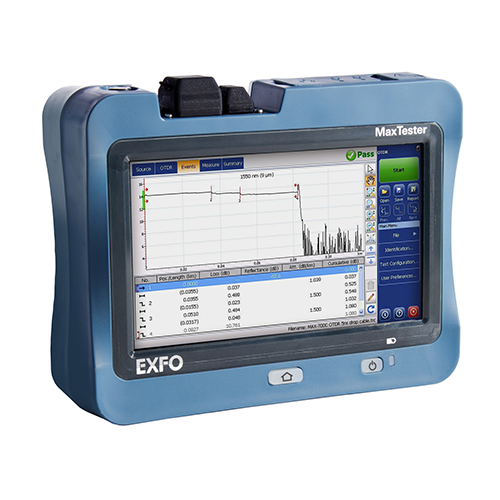
The OTDR helps measure the time light travels along a fibre and reflects, giving you a detailed picture of its quality. The process is similar whether you're working on a single-mode or multimode fibre, but the tools and settings can vary. So, how do you do it?
Before we dive into the OTDR testing process, let's quickly go over the key differences between single-mode and multimode fibres:
Single-mode fibre: Designed for long-distance communication, single-mode fibre has a small core (around 8-10 microns) and transmits signals using a laser light source.
Multimode fibre: With a larger core (50-62.5 microns), multimode fibre is designed for shorter distances and uses an LED light source.
When testing single-mode fibres, using a higher wavelength (usually 1310nm or 1550nm) is crucial as this allows for more accurate readings over long distances. You'll also want to ensure you have the right launch cable to help eliminate dead zones and give the OTDR a point of reference for measuring the fibre's loss and performance.
Example: Imagine you're testing a 5km stretch of single-mode fibre. The OTDR will highlight any issues, such as fibre breaks or bends, along the way.
Understanding the Differences Between Single-Mode and Multimode Fibre
Before we dive into the OTDR testing process, let's quickly go over the key differences between single-mode and multimode fibres:
Single-mode fibre: Designed for long-distance communication, single-mode fibre has a small core (around 8-10 microns) and transmits signals using a laser light source.
Multimode fibre: With a larger core (50-62.5 microns), multimode fibre is designed for shorter distances and uses an LED light source.
Using an OTDR for Single-Mode Fibre Testing
When testing single-mode fibres, using a higher wavelength (usually 1310nm or 1550nm) is crucial as this allows for more accurate readings over long distances. You'll also want to ensure you have the right launch cable to help eliminate dead zones and give the OTDR a point of reference for measuring the fibre's loss and performance.
Example: Imagine you're testing a 5km stretch of single-mode fibre. The OTDR will highlight any issues, such as fibre breaks or bends, along the way.
Testing Multimode Fibre with an OTDR
Due to their larger core, multimode fibres are typically tested using a different wavelength (850nm or 1300nm). OTDRs have settings tailored for multimode fibre to measure light loss and other characteristics, helping you identify issues like connectors or poor splicing.
Example: Suppose you're testing a shorter, 300m multimode fibre run. The OTDR will allow you to assess the fibre's condition and locate any faults that may disrupt your data transmission.
The Importance of Launch and Receive Cables
When testing with an OTDR, don't forget the launch and receive cables. These are the unsung heroes that help with accurate measurements. The launch cable eliminates the "dead zone" where the OTDR may not be able to measure effectively. Using the correct wires for single-mode and multimode fibres ensures more accurate test results.
Tip: Ensure the launch cable is the same type (single-mode or multimode) as the fibre you're testing.

Testing Multimode Fibre with an OTDR
Due to their larger core, multimode fibres are typically tested using a different wavelength (850nm or 1300nm). OTDRs have settings tailored for multimode fibre to measure light loss and other characteristics, helping you identify issues like connectors or poor splicing.
Example: Suppose you're testing a shorter, 300m multimode fibre run. The OTDR will allow you to assess the fibre's condition and locate any faults that may disrupt your data transmission.
The Importance of Launch and Receive Cables
When testing with an OTDR, don't forget the launch and receive cables. These are the unsung heroes that help with accurate measurements. The launch cable eliminates the "dead zone" where the OTDR may not be able to measure effectively. Using the correct wires for single-mode and multimode fibres ensures more accurate test results.
Tip: Ensure the launch cable is the same type (single-mode or multimode) as the fibre you're testing.

In the end, testing single-mode and multimode fibres with an OTDR isn't too complicated, but you need to understand the differences between the two and ensure you're using the right equipment. Adjusting the wavelength, using the proper cables, and knowing when to test each fibre type is key.
With these tips, you'll be well on your way to effectively testing single-mode and multimode fibres with your OTDR. And hey, if you ever find yourself staring at a fibre cable and wondering if it's time for a break or just another fault, at least you know how to spot the issues.
With these tips, you'll be well on your way to effectively testing single-mode and multimode fibres with your OTDR. And hey, if you ever find yourself staring at a fibre cable and wondering if it's time for a break or just another fault, at least you know how to spot the issues.
Related Products
