

What Should I Do If My Fusion Splicer Is Showing an "Alignment Error" Message?
Posted on: 12/03/2025
When your fusion splicer suddenly flashes the dreaded "alignment error" message, it can feel like a nightmare during a crucial project. But don’t panic, it’s not always a disaster. In most cases, it’s a sign that something’s slightly out of whack, and you can quickly troubleshoot it. Let’s break down the steps you should take to get your fusion splicer back on track.

Check the Fibre and Splice Preparation
First things first, make sure the fibre ends are properly cleaved. If the cleave angle is incorrect or the ends are not perfectly aligned, your fusion splicer might have trouble making a connection. Use a high-quality cleaver, and check that the fibre ends are free from debris. A messy fibre can lead to alignment errors, so ensure it's clean and properly prepared.
Inspect the Splicer’s V-Groove and Electrodes
A quick check of the V-Groove where the fibres are held can sometimes reveal misalignment due to dirt or wear. Clean the V-Groove carefully with a soft cloth and ensure it’s free of any fibre residue. Also, check the electrodes; if they are worn or dirty, they can lead to fusion issues. Sometimes, a simple cleaning or electrode adjustment can resolve alignment errors.
Perform a Reset or Calibration
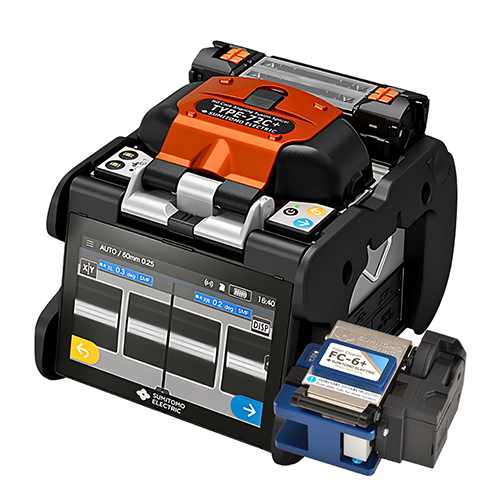
If the error persists, it’s worth doing a full reset or recalibration of the fusion splicer. Many models allow you to recalibrate the internal settings to ensure that the fibre alignment is precise. This can be done through the settings menu. Keep in mind, some splicers require periodic calibration to maintain accuracy, so check your model’s maintenance instructions.
Verify the Splicer’s Settings
Make sure the settings match the fibre type you're working with. An incorrect setting for fibre diameter or coating type can trigger alignment errors. Ensure that the splicer is set up according to the specifications of the fibre you're working on, and if you're working with multiple fibre types, double-check the settings each time you change fibres.
Common Causes of Alignment Errors:
Improper cleaving: Incorrect angle or fibre end prep
Dirty V-Groove or electrodes: Causes poor fibre contact
Incorrect settings: Mismatched fibre type or coating settings
Out-of-calibration unit: Needs recalibration for optimal performance
Quick Tip: Keep a fibre cleaning kit handy. It can save you time and frustration when dealing with alignment issues.

FAQs
What causes an alignment error on a fusion splicer?
Alignment errors usually happen due to improperly cleaved fibres, dirty V-Grooves or electrodes, or incorrect settings for the fibre type. It could also be a calibration issue.
How do I clean the V-Groove on my fusion splicer?
Use a soft, lint-free cloth to gently wipe the V-Groove. Avoid harsh cleaning agents, and ensure the groove is free of fibre debris to maintain proper alignment.
Can I fix a fusion splicer alignment error on my own?
Yes! Most alignment errors can be resolved with some basic troubleshooting steps, including checking the fibre preparation, cleaning components, and recalibrating the device.
What should I do if the error persists after recalibrating my fusion splicer?
If recalibration doesn’t resolve the issue, there might be an internal malfunction. Check your user manual or contact the supplier for further assistance or servicing.
How often should I clean my fusion splicer to prevent alignment errors?
Regular cleaning of the splicer’s V-Groove, electrodes, and fibre holders is essential for smooth operation. Depending on usage, aim to clean it after every few splicing sessions or if you notice performance issues.
With these tips in hand, you should be able to keep your fusion splicer running smoothly and avoid those dreaded alignment errors. Just remember proper maintenance goes a long way!
style="max-width:100%; max-height:100%; width:230px;height:72px" data-hubspot-wrapper-cta-id="204460433646">
 onerror="this.style.display='none'" />
 onerror="this.style.display='none'" />
Get Professional Help If Needed
If all else fails and the problem persists, it might be time to consult the user manual or reach out to your supplier for support. It could be a deeper internal issue, like a malfunctioning motor or sensor. At CMW, we offer support and guidance for fusion splicer users, so don’t hesitate to reach out if you need professional assistance.
Related Products