

How do you properly splice fibre optic cables using a fusion splicer?
Posted on: 04/02/2025
How do you properly splice fibre optic cables using a fusion splicer?
Splicing fibre optic cables using a fusion splicer is straightforward once you understand the steps. The key to a successful splice is preparation, precision, and the right equipment.
A fusion splicer uses heat to fuse the glass cores of two fibre optic cables, creating a seamless connection with minimal signal loss.
Whether you're repairing a damaged cable or extending an existing line, mastering this skill is essential for anyone working in data and voice networking.
Let’s break down the process and share some tips to make you a pro at it.
The Fusion Splicing Process: Step-by-Step
Preparation is Everything
Before you start, ensure you have all the necessary tools:
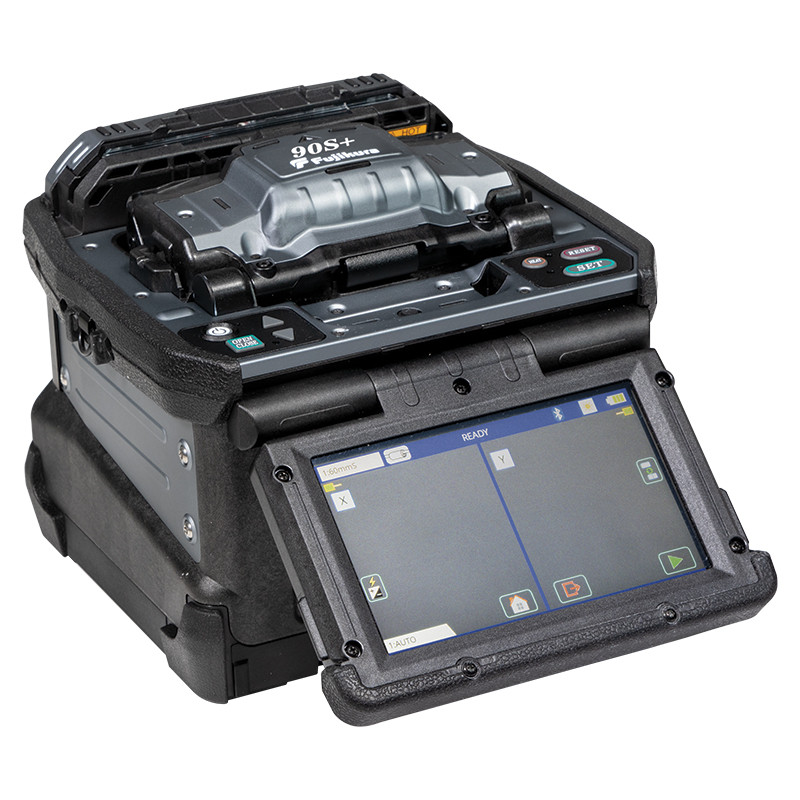
Fusion splicer (obviously).
Fibre optic cleaver.
Stripping tools.
Cleaning supplies (like isopropyl alcohol and lint-free wipes).
Heat-shrink splice protectors.
Prep the cables by stripping off the outer coating and buffer layers to expose the glass core. Use a good-quality stripping tool to avoid nicks or scratches—those imperfections will ruin the splice. A quick clean with isopropyl alcohol ensures no dirt or oils remain. Remember: clean fibre = clean splice.
Cleaving the Fibre
Think of this as giving your fibre a perfect haircut. A precise, 90-degree cleave is critical for a strong splice. Use a fibre cleaver (not your mate’s pocketknife) to ensure a smooth, flat end.
Positioning in the Fusion Splicer
Place the cleaved ends into the fusion splicer, ensuring they are aligned correctly. Modern fusion splicers (like the Fujikura 90S+ or Sumitomo T-72C) have advanced alignment tech that makes this part easier. Your job is to let the splicer do its thing but double check the positioning before you press that “start” button.
The Splice
Here comes the magic. The splicer uses an electric arc to melt the glass ends and fuse them together. The machine will give you a loss estimate afterward ideally, it should be under 0.1 dB. Anything higher? Re-check your prep work.
Protection and Testing
Once spliced, slide a heat-shrink splice protector over the joint and use the splicer’s heater to secure it. This protects the fragile connection from physical damage. Always test your splice with an OTDR (Optical Time-Domain Reflectometer) to confirm its quality.
Tips for Better Splicing Results
Invest in Quality Gear: Cheap tools lead to expensive problems. Don’t skimp on your fusion splicer or cleaver.
Practice Makes Perfect: Splicing is an art. If you’re new, practice on scrap fibre before tackling live jobs.
Keep It Clean: Dust is your enemy. Use fibre-optic cleaning tools religiously.
Why Fusion Splicing Matters
Fusion splicing isn’t just a technical skill it’s a cornerstone of modern networking. Poor splicing can lead to signal loss, high attenuation, and unhappy clients (nobody likes a laggy Zoom call). On the flip side, a well-done splice ensures fast, reliable connections. Whether you’re a data installer or an electrician, this skill makes you indispensable.

FAQs
What is a fusion splicer?
A fusion splicer is a device used to join two fibre optic cables by melting and fusing their glass cores. It ensures minimal signal loss and is essential for high quality network installations.
How long does it take to splice fibre optic cables?
On average, splicing one cable takes about 5 minutes. However, this depends on your skill level and the quality of your tools.
Can I use a fusion splicer without prior experience?
Yes, most modern fusion splicers are user-friendly and come with guided menus. However, practicing on spare cables is recommended to avoid costly mistakes.
Why is cleaving the fibre important?
Cleaving ensures the fibre ends are flat and even, which is critical for a seamless splice. A bad cleave can lead to high splice losses or a failed connection.
What’s the difference between fusion splicing and mechanical splicing?
Fusion splicing creates a permanent joint by melting the glass cores, while mechanical splicing uses a physical alignment sleeve. Fusion splicing is stronger and has lower signal loss.

Final Thoughts
Mastering fibre optic splicing with a fusion splicer is a game-changer for anyone in the networking industry. It’s all about precision, patience, and using the right tools. So, are you ready to make those perfect splices? Or will your cables forever dream of their happily-ever-after connection?
Related Products
