

How Do I Save, Export, and Analyse OTDR Test Results?
Posted on: 04/04/2025
If you’re using an Optical Time Domain Reflectometer (OTDR) for network testing, you’ve probably asked yourself, “How do I save, export, and analyse OTDR test results?” The good news is that it’s easier than it sounds. Let’s break it down so you can get the most out of your OTDR without any headaches.

Saving OTDR Test Results
After performing an OTDR test, saving the results for future reference or analysis is crucial. Most OTDR devices offer options to save your results directly to the internal memory or an external storage medium such as a USB drive. You can save your data in formats like.SDF (standard data format) or TXT is used to make it compatible with other software tools easier.
Tip: If you’re using an OTDR from leading brands like EXFO or Fluke, they offer cloud storage options that make saving and sharing your results effortless. Cloud-based storage ensures your results are safe, even if you lose or break your device!
Exporting OTDR Test Results
Once your results are saved, the next step is to export them to your computer or a different software platform for analysis. OTDRs typically allow you to export data via USB, Ethernet, or even Bluetooth in common file formats like CSV or XML. These formats are ideal for importing into third-party software for deeper analysis.
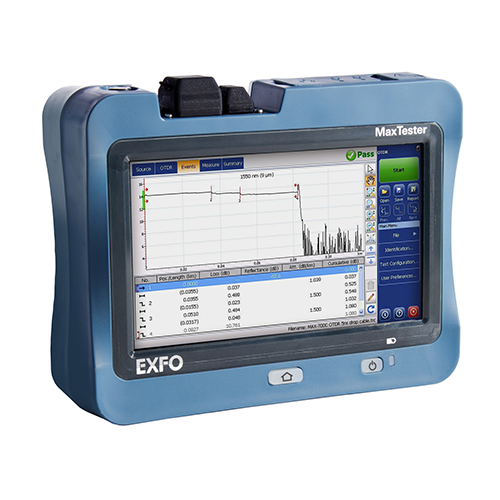
For example, EXFO’s OTDR models let you export to their online cloud service, which syncs with the OTDR’s software. If you’re working with many tests, this feature can be a lifesaver, as it automatically uploads data in real time.
Common Export Formats:
CSV allows you to transfer data to Excel for easy analysis.
XML: A more technical format used for integration with other analysis software.
PDF: This is for producing test result reports that can be shared with clients.
Analysing OTDR Test Results
Now that your data is safely exported, it’s time to analyse it. The main goal of OTDR analysis is to assess the performance and integrity of your fibre optic cables by interpreting events such as splices, connectors, or faults. This can usually be done using software provided by the OTDR manufacturer or third-party solutions.
Analysing with Software:
EXFO’s Fibre Guardian: Great for detailed analysis and troubleshooting.
Fluke Networks’ OptiFibre Pro: Offers clear event views and automated analysis of results.
OTDR User-Friendly Software: Some OTDR models come with essential software for quick analysis, but you may opt for advanced tools for more complex results.
Key Metrics to Look for:
Losses: Optical power loss is one of the most critical indicators of cable health.
Event Detection: Identifying points where splices, connectors, or other elements cause signal disruptions.
Fibre Length: Ensuring the fibre is the proper length to avoid any unexpected losses or issues.

FAQs
What is an OTDR, and why is it important?
An OTDR (Optical Time Domain Reflectometer) is a tool for measuring the quality of fibre optic cables by sending light pulses and measuring the reflections. It helps identify faults, splices, and connectors in the fibre.
What cables should I use with my OTDR?
For accurate testing, ensure you’re using launch and receive cables that match the specifications of your OTDR. For instance, EXFO OTDRs typically require specific fibre types and lengths for optimal results.
How can I export OTDR test results to my computer?
Most OTDRs allow data export via USB, Ethernet, or Bluetooth. Formats like .CSV or .PDF are commonly supported for easy integration with analysis software.
What software should I use to analyse OTDR results?
Depending on the OTDR model, you can use manufacturer-provided software (e.g., EXFO Fibre Guardian) or third-party tools for more in-depth analysis.
Can I store OTDR test results in the cloud?
Yes! Many modern OTDRs, like those from Fluke and EXFO, offer cloud storage integration, allowing you to store and access your results safely from anywhere.

Saving, exporting, and analysing OTDR test results may sound like a lot, but with the right tools and practices, you’ll be able to do it quickly. Whether you’re troubleshooting or conducting routine maintenance, this process ensures that your fibre optic networks stay in top shape.
Remember, when it comes to OTDR test results, don’t just store them; learn from them. After all, every result is a clue to improving your network.
Remember, when it comes to OTDR test results, don’t just store them; learn from them. After all, every result is a clue to improving your network.
Related Products
