

How Do I Save, Export, and Interpret OTDR Test Results?
Posted on: 30/04/2025
When working with an Optical Time Domain Reflectometer (OTDR), one of the most important things you can do is appropriately save, export, and interpret your test results.
This data is crucial for analysing the health of fibre optic cables and ensuring your installations meet industry standards.
Let's walk through the process in a simple, easy-to-understand way.
This data is crucial for analysing the health of fibre optic cables and ensuring your installations meet industry standards.
Let's walk through the process in a simple, easy-to-understand way.

Saving Your OTDR Test Results
First things first: save your results. Most OTDR devices allow you to save test results directly to the device's internal memory, a USB drive, or a cloud storage service. The method depends on the OTDR model you're using, but it is generally straightforward.
For example:
Internal Memory: Simply save the results to the device if you plan to review them on-site.
USB/External Storage: Plug in a USB stick, select "Export," and save the results for later analysis on your laptop or desktop. This is useful when you need to analyse data in depth back at the office.
Cloud Storage: Some OTDR devices are compatible with cloud-based storage, allowing real-time access to test results, no matter where you are.
Exporting OTDR Data
After saving your results, the next step is to export the data for analysis or reporting. Most modern OTDRs allow for exporting the results in standard formats like PDF, CSV, or proprietary file types (depending on the software used). Exporting as CSV is an excellent option because it enables you to manipulate the data in spreadsheet programs like Excel for further analysis.
Here's how you can typically export OTDR data:
Select the test result you want to export.
Choose the export option (USB, email, cloud, or other).
Pick your desired format (PDF for reporting, CSV for analysis).
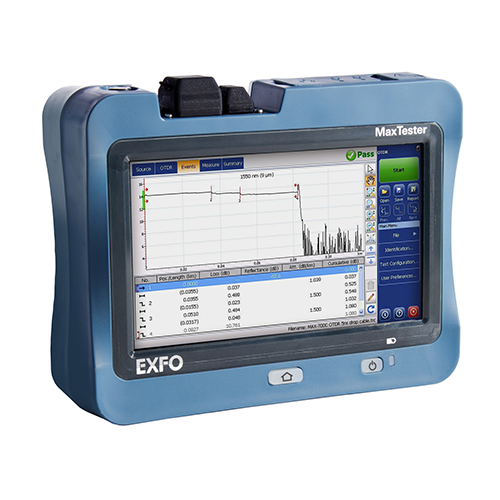
Save to your chosen destination.
This ensures the data is backed up and easy to share with your team or clients.
Now comes the tricky part: interpreting your OTDR test results. The data gathered from the OTDR can initially seem overwhelming, but you'll get the hang of it with some practice.
Reflection Points: The light pulse is reflected in these areas, indicating possible faults, like splices or connectors. A sharp spike in the graph usually represents an issue.
Loss Measurements: The OTDR provides attenuation values, which show how much light has been lost over a given distance. A high loss indicates poor-quality fibre, which could mean a faulty installation.
Distance and Time: The OTDR also provides the distance to each fault or event, helping you pinpoint problem areas in the fibre.
For example, if you see a significant spike on the graph and the loss value is high at a specific distance, it might mean there's a poor splice or connector at that point.
And don't forget about the dB scale! Negative numbers represent l, and any positive number might indicate a reflective event (think it was like a "hello" from a fault).
Look for large spikes: These are usually the troublemakers.
Check the loss: High loss = possible issues.
Use the distance info: It helps you get a specific location of the fault.
With these key points in mind, interpreting OTDR results becomes much more manageable!
This ensures the data is backed up and easy to share with your team or clients.
Interpreting OTDR Test Results
Now comes the tricky part: interpreting your OTDR test results. The data gathered from the OTDR can initially seem overwhelming, but you'll get the hang of it with some practice.
Here are the key things to look for:
Reflection Points: The light pulse is reflected in these areas, indicating possible faults, like splices or connectors. A sharp spike in the graph usually represents an issue.
Loss Measurements: The OTDR provides attenuation values, which show how much light has been lost over a given distance. A high loss indicates poor-quality fibre, which could mean a faulty installation.
Distance and Time: The OTDR also provides the distance to each fault or event, helping you pinpoint problem areas in the fibre.
For example, if you see a significant spike on the graph and the loss value is high at a specific distance, it might mean there's a poor splice or connector at that point.
And don't forget about the dB scale! Negative numbers represent l, and any positive number might indicate a reflective event (think it was like a "hello" from a fault).
Quick Tips for Interpreting OTDR Results:
Look for large spikes: These are usually the troublemakers.
Check the loss: High loss = possible issues.
Use the distance info: It helps you get a specific location of the fault.
With these key points in mind, interpreting OTDR results becomes much more manageable!

FAQs
What does an OTDR test measure?
An OTDR measures the time it takes for light pulses to reflect from various points along the fibre optic cable, which helps identify faults, splices, and connectors.
How do I save OTDR results to my computer?
Simply export the results from your OTDR to a USB drive or directly to your computer, typically in PDF or CSV format.
What's the best way to export OTDR results?
The best way depends on your needs. If you need a quick report, PDF works best. For deeper analysis or sharing, CSV is ideal.
Can I interpret OTDR results without advanced knowledge?
While there's a learning curve, key elements like loss measurements and distance readings are pretty intuitive once you understand what they mean.
How often should I perform OTDR testing?
It's recommended to perform OTDR testing at regular intervals or after significant changes in your network, like repairs or new installations, to ensure everything is functioning optimally.

Saving, exporting, and interpreting OTDR test results isn't as complicated as it might seem. With the right approach, you'll get the most out of your OTDR and ensure your fibre optic installations are in top condition.
If you're still unsure, don't hesitate to contact us at CMW for further guidance.
After all, even the best technology can be tricky without the proper support.
If you're still unsure, don't hesitate to contact us at CMW for further guidance.
After all, even the best technology can be tricky without the proper support.
Related Products
